What Is Ping and Why Does It Matter So Much in Gaming
Ping is the time it takes for data to travel from your device to the game server and back, measured in milliseconds (ms). Think of it as a round trip. You press a button, that signal goes to the server, the server processes it, and the result comes back to you. The faster this round trip happens, the smoother your game feels.
What the Numbers Actually Mean
A ping below 30ms is excellent. You will barely notice any delay at all. Between 30ms and 60ms is considered good for most games. Once you cross 80ms to 100ms, things start to feel slightly off, especially in fast-paced games like Valorant, Call of Duty, or Fortnite. Anything above 150ms and you are fighting your connection as much as your opponents.
The frustrating part is that your home internet speed is not always the problem. You could have a 500 Mbps fiber connection and still suffer from high ping in certain games. That is because speed (bandwidth) and latency (ping) are completely different things. You can download a movie in seconds and still have terrible ping in an online match.
The Real Reasons Your Ping Is High (Most People Miss These)
Most people assume high ping is caused by a slow internet plan. While your ISP plan does matter, it is rarely the root cause of gaming lag. Here are the actual culprits that most guides never explain clearly.
Bad Routing Paths Between You and the Game Server
When your data travels from your device to a game server, it does not take a straight line. It hops through multiple routers, data centers, and network nodes across the internet. Your ISP decides which path your data takes, and they almost always prioritize cost efficiency over speed. This means your data might travel in a completely illogical direction before reaching its destination, adding unnecessary milliseconds at every hop.
This is especially painful for players who connect to servers in other regions. If you are in Southeast Asia connecting to a North American server, your data might bounce through several wrong continents before arriving. Bad routing is one of the biggest causes of avoidable lag.
Packet Loss and Network Congestion
Packet loss happens when data packets get dropped or lost along the way. Even 1% to 2% packet loss can make an online game feel terrible, causing stutters, rubber-banding, and actions that simply do not register. Network congestion, especially during peak hours when many people are online, makes this worse. Your ISP’s infrastructure can get overloaded, and gaming traffic ends up competing with everything else on the line.
Distance from the Game Server
Physics plays a role too. The farther you are from the game server, the more time it physically takes for your data to arrive. If the game you love does not have servers close to your location, you are already fighting an uphill battle. However, with smart routing, this physical distance can be partially compensated for by finding faster, more direct paths.
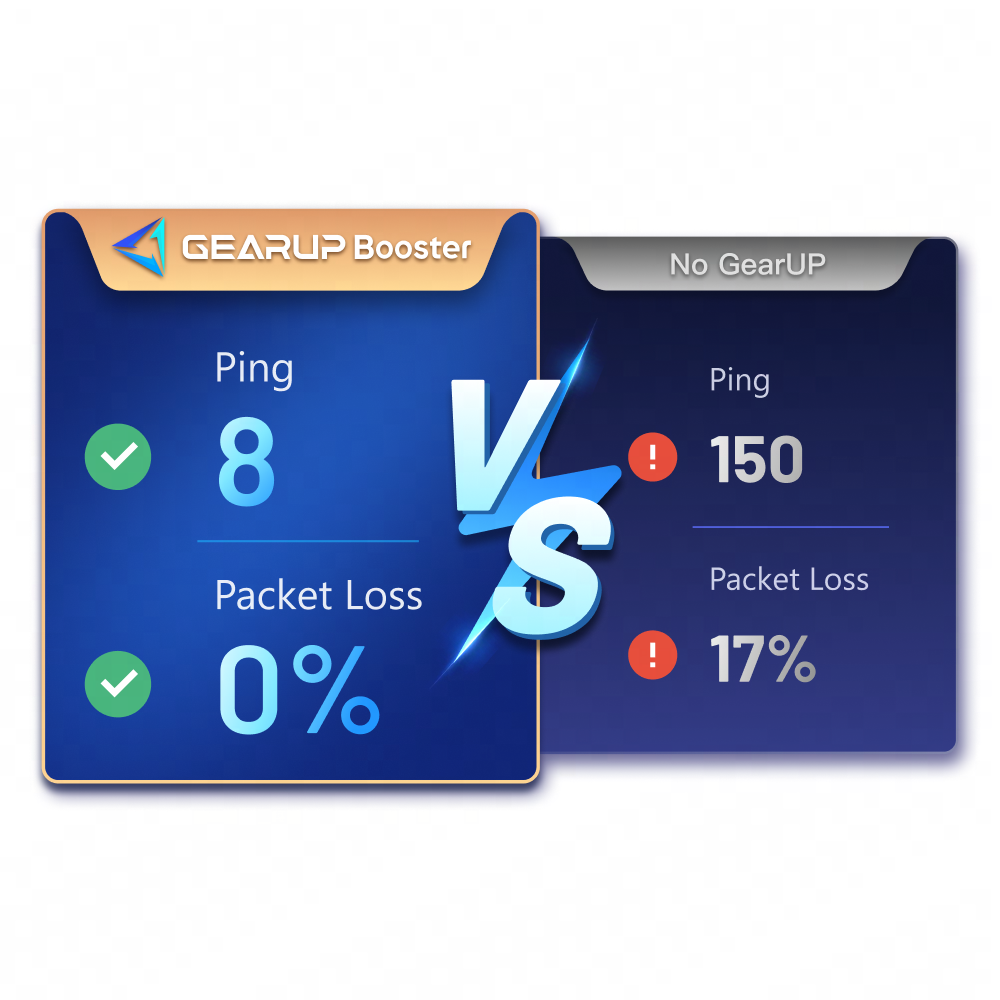
Without Optimization
- Data takes inefficient routes
- High and unstable ping
- Packet loss and jitter
- Region locks feel impossible
- Peak-hour lag spikes
With GearUP Booster
- Optimized, direct routing paths
- Lower and stable ping
- Reduced packet loss
- Cross-region play made easier
- Consistent performance 24/7
How GearUP Booster Solves the Ping Problem
GearUP Booster is a dedicated gaming network optimizer. It is not a VPN, and it is not a generic speed booster. It is specifically engineered to tackle the root causes of gaming lag by rerouting your game traffic through a smarter, more efficient network infrastructure.
Adaptive Intelligent Routing (AIR) Technology
The core technology behind GearUP is called Adaptive Intelligent Routing, or AIR. Instead of letting your ISP decide how your game data travels, GearUP takes control of that routing decision in real time. It continuously monitors thousands of possible paths to the game server and selects the fastest, most stable one for your connection.
This is not a static change. AIR adapts dynamically as network conditions change throughout your gaming session. If a node on your current path becomes congested, the system automatically reroutes around it without interrupting your game. The result is a connection that stays fast and consistent even during heavy network traffic periods.
A Global Network Built for Gamers
GearUP operates its own network of nodes positioned strategically around the world. When you use GearUP, your gaming traffic enters this network close to your location and exits close to the game server. This eliminates the long, winding routes that ISPs create and dramatically shortens the effective distance your data has to travel.
This is particularly valuable for players who want to access game servers in other regions. A player in the Philippines connecting to Hong Kong servers, or someone in Eastern Europe reaching US servers, can experience dramatically better performance because GearUP bridges the gap with its dedicated gaming infrastructure.
GearUP Works on Every Device You Play On
One of the strongest aspects of GearUP Booster is how broadly it works across platforms. Most gaming VPNs and boosters are limited to PC. GearUP supports the full range of gaming devices, which means you get consistent performance no matter how you play.
For console players, the GearUP Router (HYPEREV) brings the same optimization technology to your living room setup with a single click. You connect it to your network, set it up once, and your PlayStation, Xbox, or Switch automatically benefits from the optimized routing. No software installation needed on your console at all.
GearUP for Windows
Full PC game booster with support for thousands of titles. Also works for boosting console games through your PC connection.
GearUP for Mobile
One-tap latency reduction for Android and iOS games. Perfect for competitive mobile titles like PUBG Mobile, Mobile Legends, and Free Fire.
HYPEREV Gaming Router
A dedicated hardware solution that covers all devices on your network. Ideal for households where multiple people game simultaneously.
Global Server Coverage
No matter which regional server your game runs on, GearUP has network nodes positioned to improve your connection to it.
Is GearUP Booster Safe to Use? Will You Get Banned?
This is one of the most common questions from new users, and it is a smart thing to ask. The short answer is yes, GearUP Booster is safe to use, and no, it does not get you banned from games.
GearUP works entirely at the network level. It optimizes the path your data takes to the server; it does not interact with game files, inject code into the game process, or modify any gameplay mechanics. From the game server’s perspective, you are simply connecting with a better network. There is no modification to the game client, no exploits, and nothing that would trigger anti-cheat systems like BattlEye or Easy Anti-Cheat.
GearUP also has official partnerships with game publishers and esports organizations, including TSM (one of North America’s biggest esports teams) and games like NARAKA: BLADEPOINT, Fragpunk, and Delta Force. These partnerships exist precisely because the tool is legitimate and plays by the rules.
Who Should Use GearUP Booster
GearUP is not just for professional or hardcore gamers. If any of the following situations sound familiar, GearUP is worth trying.
You Play on Foreign or Cross-Regional Servers
Many players prefer specific regional servers because that is where their friends play, where the playerbase is larger, or where the competitive scene is more active. If you are gaming outside your region, GearUP makes a significant difference in playability. Cross-regional play that was previously too laggy to enjoy becomes a real option.
Your Ping Spikes Randomly During Sessions
If your ping is usually fine but jumps unpredictably during a session, you are likely dealing with routing instability or network congestion. GearUP’s AIR technology continuously monitors and adjusts your route, which specifically addresses this kind of unstable connection.
You Live Far from Major Game Server Hubs
Players in countries or regions that are geographically distant from popular server locations often face structurally high ping. GearUP cannot change physics, but it can find the most efficient available path and reduce unnecessary latency caused by suboptimal routing.
You Are a Mobile Gamer Dealing with Latency Issues
Mobile networks are notoriously inconsistent. GearUP’s mobile version addresses this by stabilizing your game connection even when your cellular signal fluctuates. This is particularly useful for competitive mobile titles where a single lag spike can decide a match.
Practical Tips to Get the Most Out of GearUP Booster
Once you have GearUP set up, here are a few ways to make sure you are getting the maximum benefit from it during your sessions.
Always Launch GearUP Before Opening Your Game
GearUP works best when it establishes the optimized connection route before your game client connects to the server. Make it part of your pre-game routine: open GearUP, select your game and region, confirm the connection is active, then launch your game.
Choose the Right Server Region in GearUP
GearUP lets you specify which game and which server region you are connecting to. Make sure this matches the actual server region you are playing on inside the game. Mismatched settings will reduce the effectiveness of the optimization.
Use the Ping Test Feature
GearUP includes a built-in ping test tool that lets you check your latency to different game servers before and after enabling the booster. Use this to see your actual improvement and to identify which servers give you the best performance.
Keep GearUP Updated
The team at GearUP regularly updates both the routing algorithms and the list of supported games. Staying on the latest version ensures you have the most current optimizations and that newly released games are properly supported.

Your Internet Deserves a Gaming Upgrade
High ping is not something you just have to live with. In most cases, the problem is not your internet plan and it is not your hardware. It is the inefficient path your game data takes to reach the server and come back. That is a solvable problem, and GearUP Booster solves it.
With its Adaptive Intelligent Routing technology, global network infrastructure, multi-platform support, and a growing list of game and hardware partnerships, GearUP Booster is one of the most complete gaming network optimization tools available today. Whether you are grinding ranked matches on PC, playing competitively on mobile, or gaming cross-region with friends on console, GearUP gives your connection the upgrade it deserves.
The best part? You can try it for free. There is no reason to keep letting a fixable network problem hold your gameplay back.
Ready to Drop Your Ping for Good?
Join millions of gamers worldwide who have already made the switch to smoother, faster, more stable gameplay with GearUP Booster.
Try GearUP Booster Free Today Available on Windows, iOS, Android, and Console. No credit card required to start.